Introduction
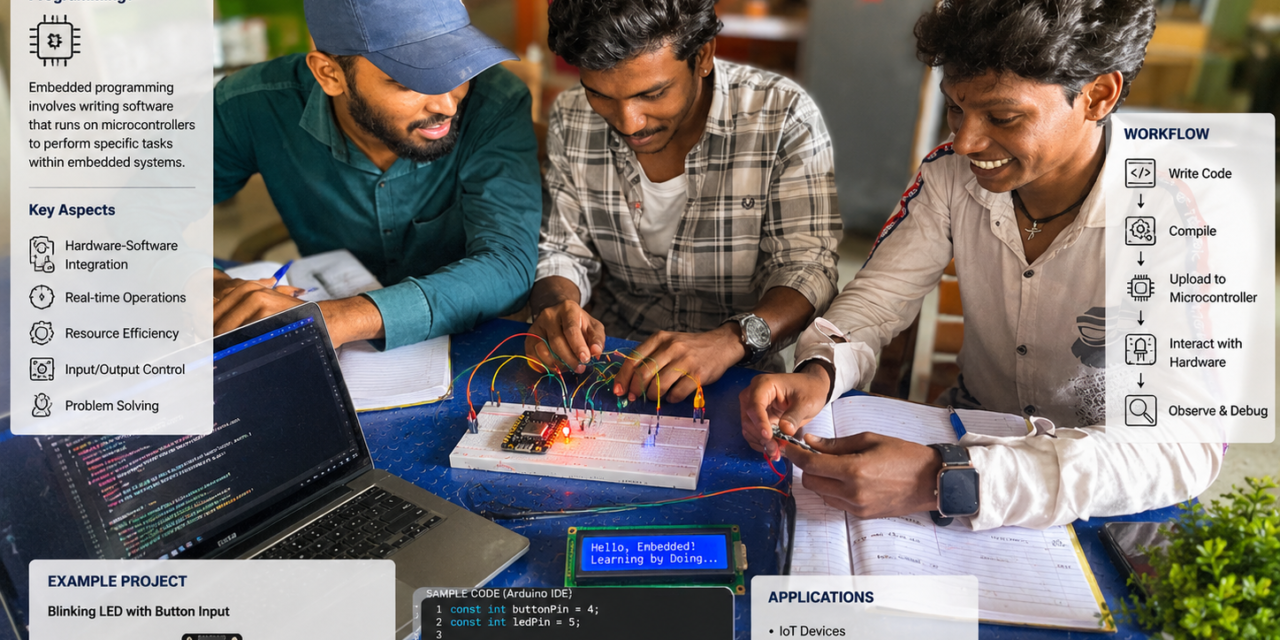
This week, I explored different microcontrollers through both group and individual assignments. In the group assignment, we compared the toolchains and development workflows of various embedded architectures, helping me understand their key differences. For the individual assignment, I studied a microcontroller datasheet and developed a simple embedded program. I tested it by interfacing the microcontroller with input and output devices and enabling wired communication. This hands-on experience improved my understanding of embedded systems and microcontroller programming.
Embedded Programming
Embedded programming is the process of writing software for small computers, known as embedded systems, that are built into electronic devices. These systems are designed to perform specific functions, such as controlling LEDs, reading sensor data, or operating motors. The program runs directly on a microcontroller or microprocessor to control the hardware and execute dedicated tasks. Embedded programming is widely used in consumer electronics, home appliances, automotive systems, industrial automation, medical devices, and IoT applications.
Embedded Systems
Embedded systems are specialized computing systems integrated into electronic devices to perform specific functions. They are commonly found in everyday products such as washing machines, automobiles, microwave ovens, and smartwatches. Unlike general-purpose computers, embedded systems are designed to execute dedicated tasks efficiently while operating with limited memory, processing power, and energy resources. They use microcontrollers or processors to process input from sensors, control outputs such as motors and LEDs, and communicate with other devices when required.


An embedded system consists of hardware and software that work together to perform a specific task. It includes a microcontroller or microprocessor to execute programs, memory to store data and instructions, input devices such as sensors to collect data, and output devices such as motors, LEDs, or displays to perform actions. Communication interfaces like UART, SPI, I²C, Bluetooth, or Wi-Fi enable data exchange with other devices, while a power supply provides the energy required for operation. Together, these components allow an embedded system to perform dedicated functions efficiently and reliably.
Individual assignment
Studied and analyzed the datasheet of a microcontroller to understand and and tested an embedded application using the microcontroller to interface with input and output devices.
Group assignment
Demonstrate and compare the toolchains and development workflows for various embedded system architectures.
What is microcontroller
A microcontroller is a small, self-contained computer on a single integrated circuit. It consists of a processor, memory, and input/output ports all in one place. Microcontrollers are essential components of embedded systems used in consumer electronics, industrial automation, robotics, and automotive applications.
What is microprocessor
A microprocessor is a programmable integrated circuit that serves as the brain of a computer system. It executes instructions, performs calculations, and manages data processing tasks. Since it does not include built-in memory or peripherals, it relies on external components such as RAM, ROM, and I/O devices. Microprocessors are commonly found in desktop computers, laptops, workstations, and embedded computing platforms.
Difference between microcontroller and microprocessor
| Microcontroller | Microprocessor |
|---|---|
| A microcontroller has a processor, memory (RAM/Flash), and input/output (I/O) ports integrated on a single chip. | A microprocessor contains only the CPU and requires external memory and I/O devices. |
| Used for dedicated and specific tasks in embedded systems. | Used for general-purpose computing and applications requiring high processing power. |
| Generally slower but more power-efficient for control applications. | Generally faster and capable of handling complex computations. |
| Has built-in RAM and Flash/ROM memory. | Requires external RAM, ROM, and peripheral devices. |
| Low power consumption and lower cost. | Higher power consumption and higher overall system cost due to external components. |
| Examples: Arduino Uno (ATmega328P), ESP32, RP2040. | Examples: Intel Core i5/i7, AMD Ryzen, ARM Cortex-A processors. |
Microcontrollers and their Datasheets overview
1.Arduino UNO

The Arduino Uno is a popular microcontroller development board based on the ATmega328P microcontroller. It is widely used for embedded system development, rapid prototyping, and educational projects. The board features digital and analog input/output pins, a USB interface for programming and communication, and an onboard voltage regulator, making it ideal for interfacing with sensors, LEDs, motors, and other electronic components.
Datasheet for Arduino UNO
- The Arduino Uno is based on the ATmega328P microcontroller.
- It operates at an operating voltage of 5 V.
- The board provides 14 digital input/output (I/O) pins, including 6 PWM-capable pins.
- It features 6 analog input pins (A0–A5) with 10-bit ADC resolution.
- The ATmega328P runs at a clock speed of 16 MHz.
- It includes 32 KB of Flash memory, 2 KB of SRAM, and 1 KB of EEPROM.
- The board has a USB interface for programming, serial communication, and power supply.
- An onboard LED is connected to digital pin 13 (D13) for testing and debugging purposes.
Embedded programming with Arduino

To begin, I downloaded the Arduino IDE for Windows from the official Arduino website and installed it on my system.
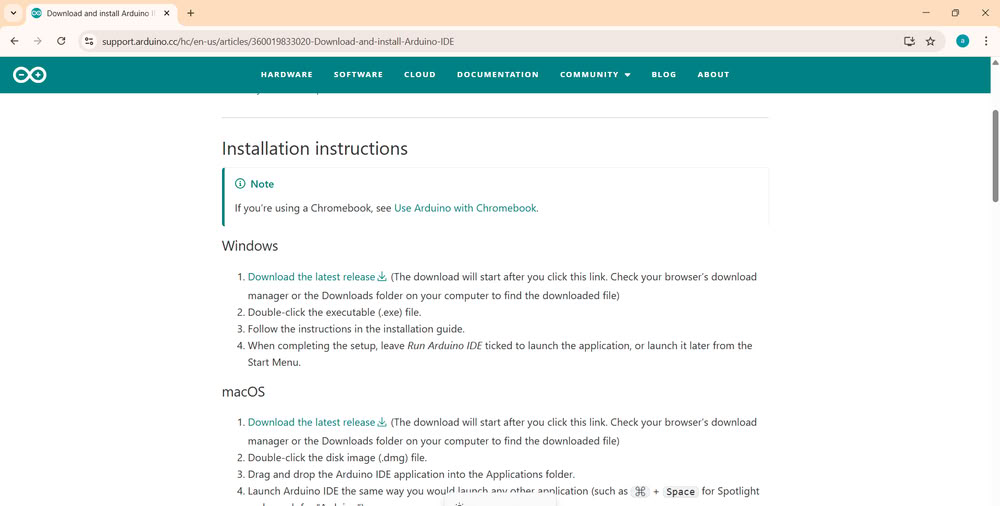
I installed the Arduino UNO version.
CODE
void setup()  {
  pinMode(B1000, OUTPUT);       // Pin B
}

void loop()  {
  digitalWrite(B1000, B1);       // HIGH (1)
  delay(1000);
  degitalWrite(B1000, B0);       // LOW (0)
  delay(1000);
}
Binary number system
The binary number system consists of only two digits, 0 and 1, and serves as the fundamental language of digital electronics. Microcontrollers used in Arduino and Espressif development boards interpret binary values to control hardware, where 1 indicates a HIGH (ON) signal and 0 indicates a LOW (OFF) signal. This enables electronic devices to execute programmed instructions accurately and efficiently.
Binary address
A binary address represents a specific location in the memory of a microcontroller using the binary number system. In the ATmega328P microcontroller on the Arduino Uno, every memory location is assigned a unique binary address where program instructions and data are stored. When the program runs, the microcontroller retrieves instructions from these addresses and executes them sequentially. Since microcontrollers process digital signals, binary values 1 (HIGH) and 0 (LOW) are used to represent and access memory efficiently.
const int ledPin = 0b11001;    // Binary 11001 = Decimal 25 (GPIO 25)

void setup() {
  pinMode(ledPin, OUTPUT);
}

void loop() {
  digitalWrite(ledPin, HIGH);   // LED ON
  delay(0b111110100);

  digitalWrite(ledPin, LOW);    // LED OFF
  delay(0b111110100);
}
Hexadecimal Number System
The hexadecimal number system is a base-16 numbering system that uses 16 symbols (0–9 and A–F). It is widely used in embedded systems because it provides a compact and human-readable representation of binary data.
The hexadecimal number system is an essential part of embedded systems programming. It is used to represent memory addresses, register values, machine code, GPIO configurations, and firmware data. Because each hexadecimal digit corresponds to 4 binary bits, hexadecimal provides a concise and efficient way to work with binary information in microcontrollers and embedded devices.
const int ledPin = 0x19;   // GPIO 25 (0x19 = 25 in decimal)

void setup() {
  pinMode(ledPin, OUTPUT);
}

void loop() {
  digitalWrite(ledPin, HIGH);  // Turn LED ON
  delay(0x1F4);

  digitalWrite(ledPin, LOW);   // Turn LED OFF
  delay(0x1F4);
}
2.XIAO RP2040

The XIAO RP2040 is a compact and high-performance microcontroller board developed by Speed Studio using the Raspberry Pi RP2040 microcontroller. It features a dual-core ARM Cortex-M0+ processor that operates at speeds of up to 133 MHz, providing reliable performance for embedded and IoT applications. The board includes 264 KB of SRAM and 2 MB of onboard flash memory to store programs and data efficiently. Even with its small form factor, the XIAO RP2040 offers a wide range of interfaces such as GPIO, analog input, PWM, I2C, SPI, and UART, making it suitable for connecting different sensors and modules. It can be programmed using Arduino IDE, MicroPython, or Circuit Python, allowing both beginners and experienced developers to work with it easily. Its compact design, low power consumption, and flexible features make it an excellent choice for robotics, smart devices, wearable technology, and automation projects.
Datasheet for XIAO RP2040
- The XIAO RP2040 is based on the RP2040 microcontroller developed by the Raspberry Pi Foundation.
- It operates with a 3.3V supply voltage.
- The board features a dual-core ARM Cortex-M0+ processor running at frequencies up to 133 MHz.
- A USB Type-C connector is provided for programming and power input.
- The board offers 11 GPIO pins for interfacing with external hardware.
- Reset and Boot buttons are available for resetting the board and entering bootloader mode for programming.
LED Blinking with RP2040

const int LED = LED_BUILTIN;

void setup() {
  pinMode(LED, OUTPUT);
}

void loop() {
  digitalWrite(LED, HIGH);   // LED ON
  delay(1000);

  digitalWrite(LED, LOW);    // LED OFF
  delay(1000);
}
3.Micropython on ESP32

The ESP32-WROOM-32 (USB Type-C) is a powerful development board based on the ESP32 microcontroller developed by Espressif Systems. It features a USB Type-C connector for easy programming and power supply. The board has built-in Wi-Fi and Bluetooth, allowing it to communicate wirelessly with other devices and connect to the internet. It offers multiple digital and analog input/output pins for interfacing with sensors, LEDs, motors, displays, and other electronic components. Due to its high performance and wireless capabilities, the ESP32-WROOM-32 is widely used in embedded systems, Internet of Things (IoT) applications, home automation, and wireless communication projects.
Datasheet for ESP32-WROOM-32
- ESP32-WROOM-32 is built around the ESP32 microcontroller.
- The board requires a 3.3 V power supply for operation.
- Built-in 2.4 GHz Wi-Fi and Bluetooth 4.2 (BLE + Classic).
- The board includes a USB Type-C interface for programming and power delivery.
- It provides multiple GPIO pins for digital input and output.
- Supports ADC, DAC, PWM, UART, SPI, and I²C interfaces.
MicroPython is an optimized implementation of the Python programming language developed for embedded systems and microcontrollers. It provides an easy-to-use programming environment for controlling hardware peripherals, including LEDs, sensors, displays, and communication modules. Compared to traditional embedded programming languages such as C and C++, MicroPython offers a simpler syntax and faster development. Microcontrollers like the Raspberry Pi Pico support MicroPython, enabling users to develop, upload, and execute programs directly from the board’s internal memory. The firmware automatically executes the stored code after power-up or reset.
Installation of Thonny:-


I downloaded Thonny IDE from its official website by selecting the installer for my operating system. It supports Windows, macOS, and Linux.


Here is how I use esp32 and try onboard LED blinking and external LED blinking using micropython
Onboard LED Blinking


Then i use led blinking code. I clicked the Run button, and the LED turned on.
External LED Blinking


Similarly using breadboard I connect one led.
4.XIAO ESP32C3

The ESP32-C3 is a low-power microcontroller developed by Espressif Systems. It features built-in Wi-Fi and Bluetooth for wireless communication. The board uses a RISC-V processor, making it suitable for IoT, embedded systems, and smart wireless applications.
Datasheet for ESP32C3
- The ESP32-C3 is powered by the ESP32-C3 RISC-V microcontroller from Espressif Systems.
- The device operates at a 3.3 V supply voltage.
- It integrates 2.4 GHz Wi-Fi and Bluetooth 5 Low Energy (BLE).
- It includes a USB Type-C connector for programming and power.
- Multiple GPIO pins are available for peripheral interfacing.
- It supports external flash memory, typically 4 MB.
- It provides multiple GPIO pins with ADC, PWM, UART, SPI, and I²C support.
LED Blinking with XIAO esp32c3

const int ledPin = 13;

void setup() {
  pinMode(ledPin, OUTPUT);
}

void loop() {
  digitalWrite(ledPin, HIGH);  // LED ON
  delay(1000);
  digitalWrite(ledPin, LOW);   // LED OFF
  delay(1000);
}
5.Rasberry Pi Pico

The Raspberry Pi Pico is a low-cost microcontroller development board designed by the Raspberry Pi Foundation. It is built around the RP2040 microcontroller and is widely used for embedded systems, robotics, IoT, and automation.
Datasheet For Rasberry Pi Pico
- Raspberry Pi Pico is based on the RP2040 microcontroller developed by Raspberry Pi.
- It operates at a 3.3 V operating voltage.
- It supports communication through 2 UART, 2 SPI, and 2 I²C interfaces.
- The board provides 26 multifunction GPIO pins for digital input and output.
- It supports 3 analog input (ADC) channels with 12-bit resolution.
- The board dimensions are approximately 51 mm × 21 mm.
LED Blinking with Rasberry Pi Pico

const int LED_PIN = 15;   // Change this to your GPIO pin

void setup() {
  pinMode(LED_PIN, OUTPUT);
}

void loop() {
  digitalWrite(LED_PIN, HIGH);  // LED ON
  delay(1000);                  // Wait 1 second

  digitalWrite(LED_PIN, LOW);   // LED OFF
  delay(1000);                  // Wait 1 second
}
Group assignment
Task
This assignment we studied and compared the toolchains and development workflows used for different embedded system architectures. We learned how various platforms, such as AVR, ARM, ESP32, and RP2040, use different development tools and programming environments. We also compared popular IDEs, including Arduino IDE, STM32CubeIDE, MPLAB X, and ESP-IDF, based on their features and applications. We observed that each toolchain has its own strengths and is suitable for specific embedded system requirements. Overall, we gained a better understanding of embedded system development and the importance of selecting the appropriate toolchain for a given application.
Comparison Of Different Microcontroller
| Feature | Arduino Uno | ESP32-WROOM | ESP32-C3 | Seeed XIAO RP2040 | Raspberry Pi Pico |
|---|---|---|---|---|---|
| Architecture | AVR | Xtensa LX6 (Dual-core) | RISC-V (Single-core) | ARM Cortex-M0+ | ARM Cortex-M0+ |
| Microcontroller | ATmega328P | ESP32-WROOM-32 | ESP32-C3 | RP2040 | RP2040 |
| Core | 8-bit Single-core | 32-bit Dual-core | 32-bit Single-core | 32-bit Dual-core | 32-bit Dual-core |
| Clock Speed | 16 MHz | Up to 240 MHz | Up to 160 MHz | Up to 133 MHz | Up to 133 MHz |
| Operating Voltage | 5 V | 3.3 V | 3.3 V | 3.3 V | 3.3 V |
| GPIO Voltage | 5 V | 3.3 V | 3.3 V | 3.3 V | 3.3 V |
| Digital Pins | 14 | Up to 34 | Up to 22 | 11 | 26 |
| PWM Pins | 6 | Up to 16 | Up to 6 | 11 | 16 |
| Analog Pins | 6 (10-bit ADC) | Up to 18 (12-bit ADC) | 6 (12-bit ADC) | 4 (12-bit ADC) | 3 ADC channels (12-bit) |
| Communication | UART, SPI, I²C | UART, SPI, I²C, CAN, I²S | UART, SPI, I²C, CAN, I²S | UART, SPI, I²C | UART, SPI, I²C, USB |
| Wi-Fi | ❌ No | ✅ 2.4 GHz Wi-Fi | ✅ 2.4 GHz Wi-Fi | ❌ No | ❌ No |
| Bluetooth | ❌ No | ✅ Bluetooth Classic + BLE | ✅ BLE 5.0 | ❌ No | ❌ No |
| Programming Language | C/C++ | C/C++, MicroPython, Arduino | C/C++, MicroPython | C/C++, MicroPython, CircuitPython | C/C++, MicroPython, CircuitPython |
| On-board LED Pin | D13 | GPIO2 (varies by board) | GPIO8 (common) | GPIO25 | GPIO25 |
| Flash Memory | 32 KB | 4 MB (typical) | 4 MB (typical) | 2 MB | 2 MB |
| RAM | 2 KB SRAM | 520 KB SRAM | 400 KB SRAM | 264 KB SRAM | 264 KB SRAM |
| USB Interface | USB Type-B (via ATmega16U2) | Micro-USB/USB-C (board dependent) | USB Type-C/Micro-USB (board dependent) | USB Type-C | Micro-USB |
| Advantages | Beginner-friendly, extensive libraries, large community | Built-in Wi-Fi & Bluetooth, powerful dual-core CPU, ideal for IoT | Low power, secure RISC-V architecture, BLE support | Ultra-compact, fast RP2040, USB-C, breadboard-friendly | Low cost, powerful dual-core MCU, extensive SDK support |

Toolchain and Workflow Comparison
A toolchain is a collection of software tools used to develop, compile, upload, and debug programs for embedded systems and microcontrollers. In this assignment, the development of the Arduino Uno, ESP32-WROOM, ESP32-C3, Speed XIAO RP2040, and Raspberry Pi Pico was carried out using the Arduino IDE and Thonny IDE. These IDEs provided the necessary environment for writing source code, compiling programs, uploading firmware to the target boards, and testing the applications.
| Toolchain Component | Arduino Uno | ESP32-WROOM | ESP32C3 XIAO | XIAO RP2040 |
|---|---|---|---|---|
| Architecture | AVR 8-bit | Xtensa 32-bit | RISC-V 32-bit | ARM Cortex-M0+ 32-bit |
| Programming Language | C/C++ | C/C++, MicroPython | C/C++, MicroPython | C/C++, MicroPython |
| IDE (Editor) | Arduino IDE | Arduino IDE, Thonny IDE | Arduino IDE, Thonny IDE | Arduino IDE, Thonny IDE |
| Compiler | AVR-GCC | Xtensa-ESP32-GCC | RISC-V GCC | ARM GCC (arm-none-eabi-gcc) |
| Uploader Tool | avrdude | esptool | esptool | UF2 Bootloader / bossac |
| Firmware | Arduino Bootloader | ESP32 Firmware / MicroPython Firmware | ESP32-C3 Firmware / MicroPython Firmware | RP2040 Firmware / MicroPython Firmware |
| Connection Type | USB Type-B | Micro-USB | USB Type-C | USB Type-C |
| Execution Method | Compiled and uploaded | Compiled or Interpreted | Compiled or Interpreted | Compiled or Interpreted |

Arduino IDE Workflow
- Write the program in the Arduino IDE.
- Select the target board (Arduino Uno / ESP32-WROOM / Speed XIAO ESP32-C3 / ESP32-WROOM / Speed XIAO RP2040 / Raspberry Pi Pico).
- Compile the program to check for errors and generate the executable file.
- Upload the program to the microcontroller using a USB connection.
- Execute and verify the program on the microcontroller.
MicroPython Workflow
- Install the MicroPython firmware on the microcontroller
- Open the Thonny IDE and connect the microcontroller via USB.
- Write the Python program in the Thonny editor.
- Upload (save) the program to the microcontroller.
- Run the program, which executes immediately on the microcontroller.
Comparison Summary
- Arduino Uno uses the AVR-GCC compiler and primarily supports C/C++ programming through the Arduino IDE.
- ESP32-WROOM, ESP32-C3, Speed XIAO RP2040, and Raspberry Pi Pico support both C/C++ and MicroPython, offering flexibility for different applications.
- Arduino IDE is commonly used for writing, compiling, and uploading C/C++ programs to all supported development boards.
- Thonny IDE provides a simple environment for developing and uploading MicroPython programs.
- MicroPython offers a beginner-friendly workflow with faster code development and testing.
- C/C++ delivers higher execution speed, lower memory usage, and greater control over hardware resources, making it suitable for performance-critical embedded applications.
Conclusion
From this comparison, the Arduino Uno is well suited for beginners and basic embedded system development due to its simple architecture, ease of programming, and extensive community support. The ESP32-WROOM and ESP32-C3 offer advanced features such as built-in Wi-Fi, Bluetooth, and higher processing performance, making them ideal for IoT and wireless communication applications. The ESP32-C3, based on the modern RISC-V architecture, provides efficient performance with low power consumption. The Seeed XIAO RP2040 and Raspberry Pi Pico, both powered by the RP2040 dual-core microcontroller, deliver high processing speed and reliable performance, making them suitable for real-time embedded systems, robotics, and control applications. Overall, MicroPython simplifies development and enables rapid prototyping, whereas C/C++ offers superior execution speed, efficient memory usage, and greater control over hardware resources, making it the preferred choice for performance-critical embedded applications.